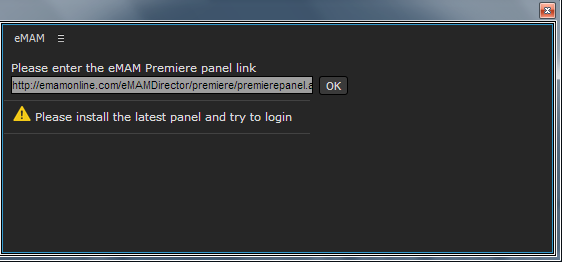
When is 'Please install latest panel and try to login' message displayed?

When is 'Please install latest panel and try to login' message displayed?

Please Install the latest panel and try to login: When there is a change in version of the eMAM panel, below message appears.
Depending on where you have installed panel (Windows or MAC), install latest version of eMAM.
    • Related Articles

    • How to solve eMAM Panel and eFeeder loading problem after latest Microsoft security patches

      Microsoft released a security update which is having changes in the cookie handling. Please refer to this article for more details - https://devblogs.microsoft.com/dotnet/net-framework-december-2019-security-and-quality-rollup/ This will affect the ...
    • How to remove assets stuck in Uploading Status from the Premiere Panel

      How to remove assets stuck in Uploading Status from the Premiere Panel Introduction: Sometimes during an export, either Premiere can get crashed or due to some unexpected errors, export will not happen properly. Even then the panel will make entries ...
    • Bug Fixes eMAM 5.4

      Bug Fixes in eMAM 5.4 BUG ID DESCRIPTION 5.3.1_18NOV2021 11889 Storage DNA API change to handle "404 not found" in the response. 11899 Schedule metadata is not getting updated for PATCH api/v1/assets/{AssetId}/AssetMetadata 11708 PFR is not working ...
    • How to change the Server URL in eMAM Panels in SSO authentication

      If the SSO authentication is enabled, you have to follow the below steps to change the Server URL in eMAM panels. Below example is explained with eMAM panel for Premiere. Please check-in your projects before proceeding with these steps. 1. First you ...
    • What does Error code 154213601 indicate in eMAM Premiere panel?

      Error code 154213601: This message appears when you try to import a set of assets and the asset path is not accessible from the Premiere machine. Ensure that the asset location is accessible from the Premiere machine.